---
title: Variant Explorer
description: Variant Explorer allows users to search for variants across all your samples using a wide range of filters and criteria.
---
[Skip to content](https://docs.varsome.com/en/variant-explorer#main-content)
English
Show submenu for translations
[Submit a Support Request](https://docs.varsome.com/en/kb-tickets/new?hsLang=en) [Customer portal](https://docs.varsome.com/support-requests?hsLang=en)
[![varsome-new.png\]](https://docs.varsome.com/hs-fs/hubfs/varsome-new.png?height=40&name=varsome-new.png)](https://docs.varsome.com/en?hsLang=en)
- Editions
Show submenu for Editions
- [VarSome.com](https://landing.varsome.com/varsome)
- [VarSome Clinical](https://landing.varsome.com/varsome-clinical)
- [VarSome Premium](https://landing.varsome.com/varsome-premium)
- [VarSome API](https://landing.varsome.com/varsome-api)
- [VarSome Insights](https://landing.varsome.com/varsome-insights)
- About
Show submenu for About
- [The Company](https://saphetor.com/)
- [Contact Us](https://landing.varsome.com/contact)
- [Distributors](https://landing.varsome.com/distributors)
- [Become a Partner](https://landing.varsome.com/become-varsome-partner)
- [Community](https://varsome.com/community-contributions/)
- [Cite VarSome!](https://varsome.com/about/general/varsome-citations/)
- Resources
Show submenu for Resources
- [Datasources](https://varsome.com/datasources/)
- [Germline Classification](https://varsome.com/about/resources/germline-implementation/)
- [Somatic Classification](https://varsome.com/about/resources/somatic-implementation/)
- [CNV Classification](https://varsome.com/about/resources/sv-implementation/)
- [Help Center](https://docs.varsome.com/)
- [Library](https://landing.varsome.com/whitepapers)
- [IVDR](https://landing.varsome.com/ivdr-whitepaper)
- [Legal & Compliance](https://docs.varsome.com/en/legal-compliance)
- Blog
Show submenu for Blog
- [Platform Updates](https://updates.varsome.com/en)
- [Company News](https://news.varsome.com/en)
- [VarSome Annotated](https://blog.varsome.com/annotated)
Open main navigation
Close main navigation
- Editions
Show submenu for Editions
- [VarSome.com](https://landing.varsome.com/varsome)
- [VarSome Clinical](https://landing.varsome.com/varsome-clinical)
- [VarSome Premium](https://landing.varsome.com/varsome-premium)
- [VarSome API](https://landing.varsome.com/varsome-api)
- [VarSome Insights](https://landing.varsome.com/varsome-insights)
- About
Show submenu for About
- [The Company](https://saphetor.com/)
- [Contact Us](https://landing.varsome.com/contact)
- [Distributors](https://landing.varsome.com/distributors)
- [Become a Partner](https://landing.varsome.com/become-varsome-partner)
- [Community](https://varsome.com/community-contributions/)
- [Cite VarSome!](https://varsome.com/about/general/varsome-citations/)
- Resources
Show submenu for Resources
- [Datasources](https://varsome.com/datasources/)
- [Germline Classification](https://varsome.com/about/resources/germline-implementation/)
- [Somatic Classification](https://varsome.com/about/resources/somatic-implementation/)
- [CNV Classification](https://varsome.com/about/resources/sv-implementation/)
- [Help Center](https://docs.varsome.com/)
- [Library](https://landing.varsome.com/whitepapers)
- [IVDR](https://landing.varsome.com/ivdr-whitepaper)
- [Legal & Compliance](https://docs.varsome.com/en/legal-compliance)
- Blog
Show submenu for Blog
- [Platform Updates](https://updates.varsome.com/en)
- [Company News](https://news.varsome.com/en)
- [VarSome Annotated](https://blog.varsome.com/annotated)
- English
Show submenu for translations
- [Submit a Support Request](https://docs.varsome.com/en/kb-tickets/new)
- [Customer portal](https://docs.varsome.com/support-requests)
- [Contact us](https://docs.varsome.com/en/kb-tickets/new)
[Contact us](https://docs.varsome.com/en/kb-tickets/new?hsLang=en)
How can we help you?
- There are no suggestions because the search field is empty.
1. [VarSome Help Center](https://docs.varsome.com/en?hsLang=en)
2. [Analysis of the results](https://docs.varsome.com/en/analysis-of-the-results?hsLang=en)
3. [Results](https://docs.varsome.com/en/analysis-of-the-results?hsLang=en#results)
# Variant Explorer
## The Variant Explorer functionality enables organisations to perform advanced variant searches across all samples within their organization, identifying variants based on customisable criteria.
Please note that Variant Explorer is included with VarSome Clinical and can be enabled upon request.
**Variant Explorer** enables you to search for variants across all samples within your organization using a wide range of criteria, including chromosome and position, ClinVar classification, pathogenicity class, custom variant classification, samples phenotypes and phenotypes associated with overlapping genes, and somatic tier.
This functionality is configured at the group level and, once enabled, can be accessed directly from the VarSome Clinical top menu.
[](https://docs.varsome.com/hubfs/image-png-Sep-21-2026-12-13-03-4544-PM.png?hsLang=en)
When you open the **Variant Explorer** main page, you can begin your search by adding the desired criteria. You may include multiple criteria as needed, and then run the query to retrieve matching results.
[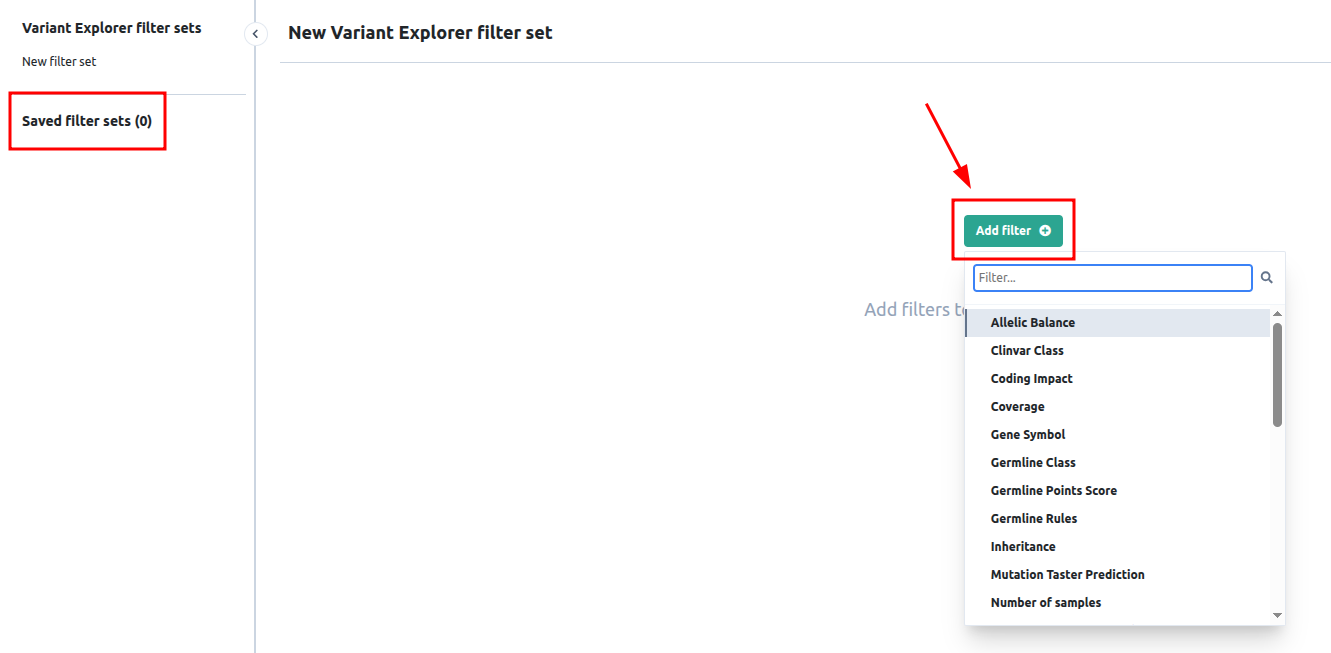](https://docs.varsome.com/hubfs/image-png-Sep-21-2026-12-14-20-8412-PM.png?hsLang=en)
[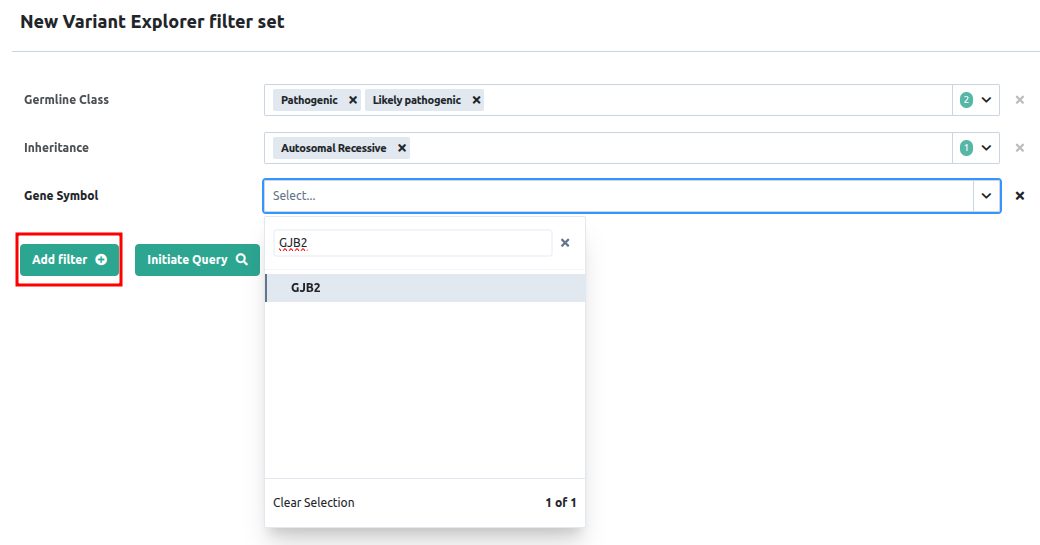](https://docs.varsome.com/hubfs/image-png-Sep-21-2026-12-18-58-3970-PM.png?hsLang=en)
[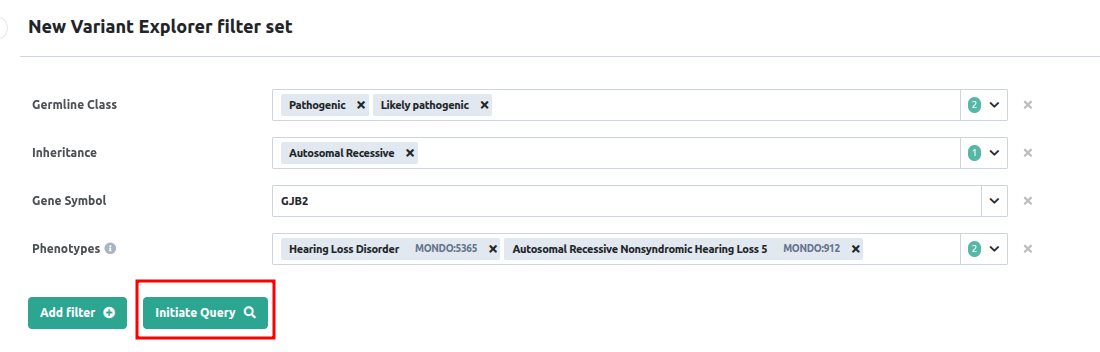](https://docs.varsome.com/hubfs/image-png-Sep-21-2026-12-20-14-5498-PM.png?hsLang=en)
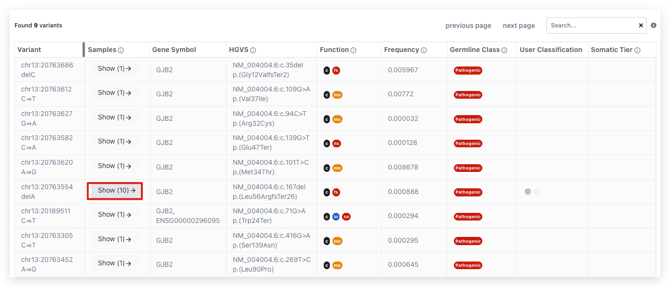
The results are displayed in a tabular format, showing in the **Samples** column how many samples contain each variant. In addition, you can save your filtering criteria for future reuse as needed.
[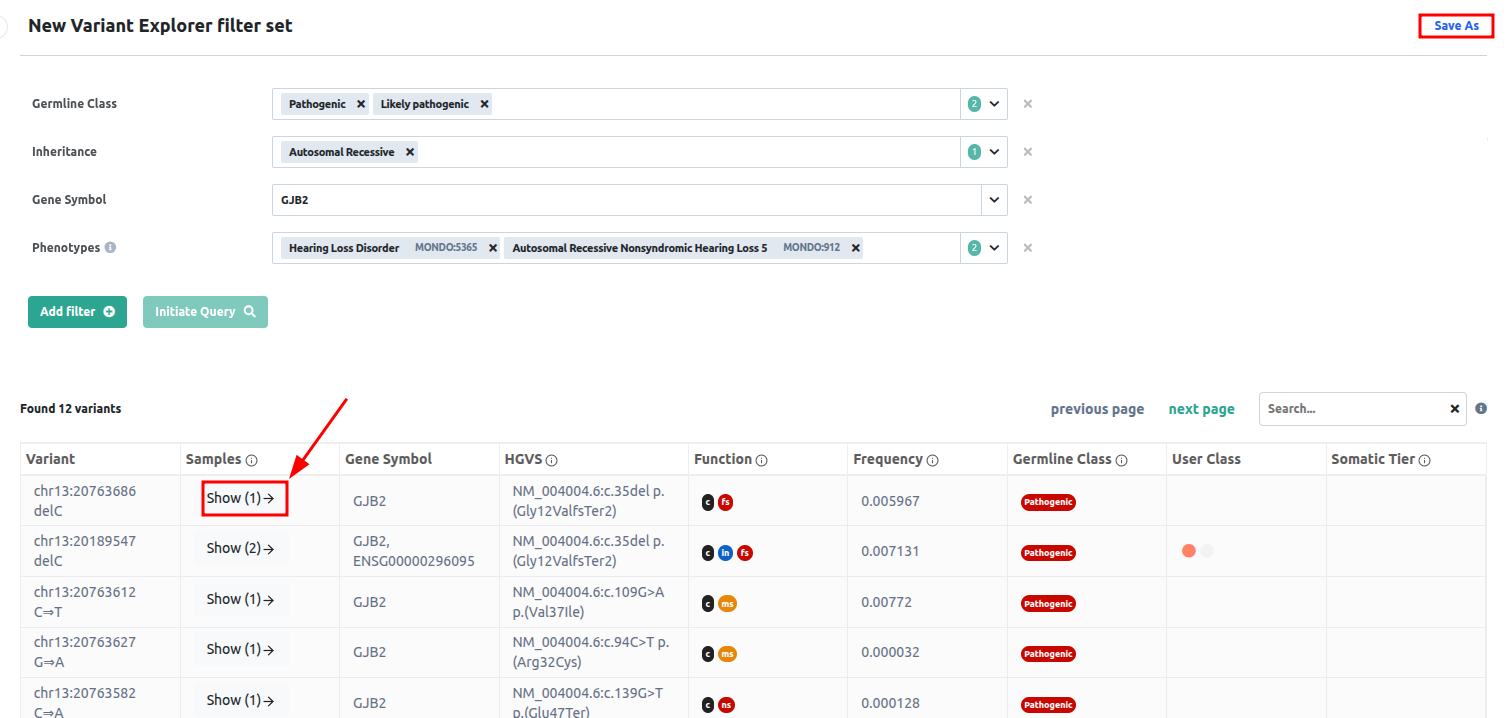](https://docs.varsome.com/hubfs/image-png-Sep-21-2026-12-21-53-6830-PM.png?hsLang=en)
If the variant is found in multiple samples, you can click **Show** to view each occurrence. Each row includes a link to the corresponding analysis, allowing you to open and review the analysis in detail.
In the case of multi-sample analyses, the occurrence is displayed under the specific sample name within the multi-sample analysis.
[](https://docs.varsome.com/hubfs/image-png-Jan-15-2026-12-41-53-7503-PM.png?hsLang=en)[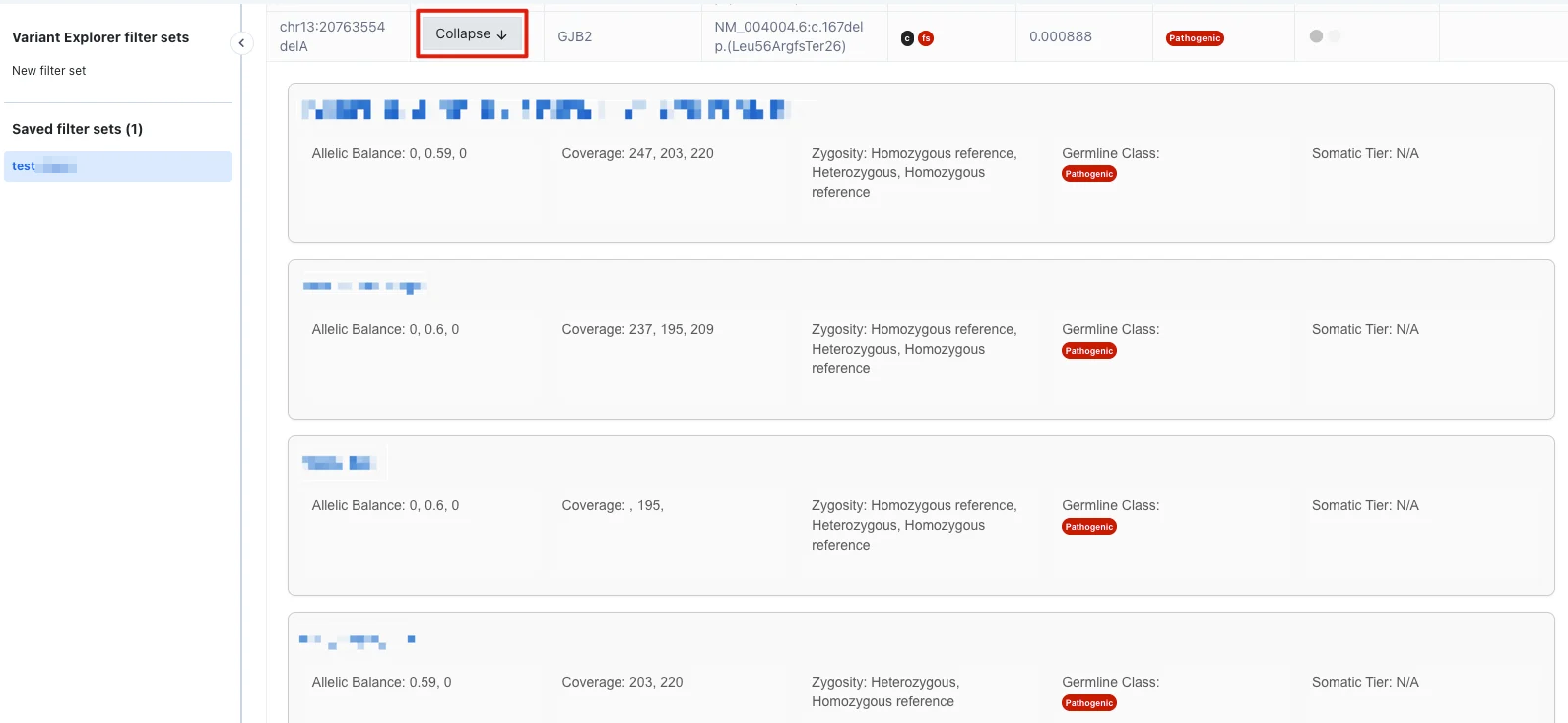](https://docs.varsome.com/hubfs/image-png-Sep-21-2026-12-50-35-2456-PM.png?hsLang=en)
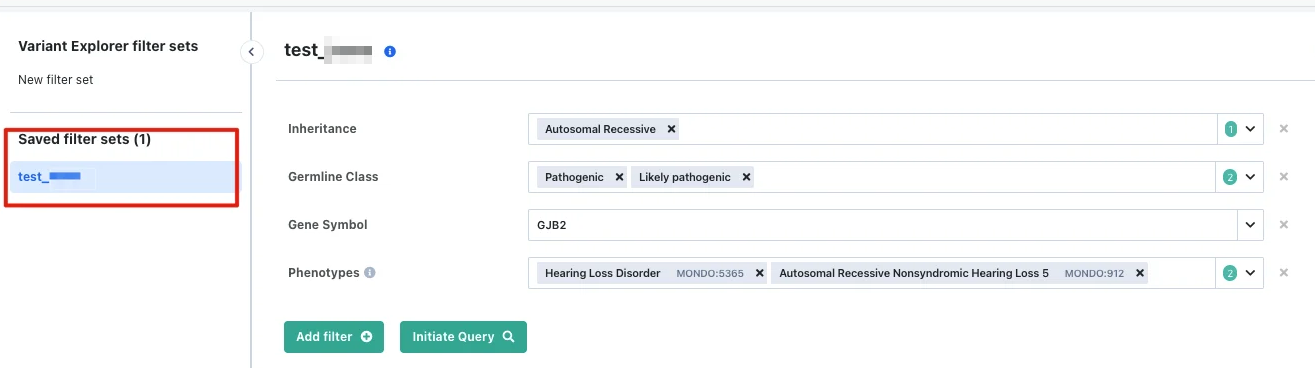
You can always access your saved filter sets to either apply them directly as needed or edit them to include new criteria.
[](https://docs.varsome.com/hubfs/image-png-Sep-21-2026-12-51-45-0995-PM.png?hsLang=en)
- [Registration & Billing](https://docs.varsome.com/en/registration-billing?hsLang=en#main-content)
- [User account management](https://docs.varsome.com/en/registration-billing?hsLang=en#user-account-management)
- [Storage management](https://docs.varsome.com/en/registration-billing?hsLang=en#storage-management)
- [Pricing and Billing](https://docs.varsome.com/en/registration-billing?hsLang=en#pricing-and-billing)
- [VarSome Clinical Tokens](https://docs.varsome.com/en/registration-billing?hsLang=en#varsome-clinical-tokens)
- [Management of Samples and Analyses](https://docs.varsome.com/en/management-of-samples-and-analyses?hsLang=en#main-content)
- [Uploading files](https://docs.varsome.com/en/management-of-samples-and-analyses?hsLang=en#uploading-files)
- [Managing Samples](https://docs.varsome.com/en/management-of-samples-and-analyses?hsLang=en#managing-samples)
- [Managing Workflows](https://docs.varsome.com/en/management-of-samples-and-analyses?hsLang=en#managing-workflows)
- [Launching analyses](https://docs.varsome.com/en/management-of-samples-and-analyses?hsLang=en#launching-analyses)
- [Analysis of the results](https://docs.varsome.com/en/analysis-of-the-results?hsLang=en#main-content)
- [Analyses](https://docs.varsome.com/en/analysis-of-the-results?hsLang=en#analyses)
- [Results](https://docs.varsome.com/en/analysis-of-the-results?hsLang=en#results)
- [Filters](https://docs.varsome.com/en/analysis-of-the-results?hsLang=en#filters)
- [Reporting](https://docs.varsome.com/en/analysis-of-the-results?hsLang=en#reporting)
- [Quality Control](https://docs.varsome.com/en/analysis-of-the-results?hsLang=en#quality-control)
- [Legal & compliance](https://docs.varsome.com/en/legal-compliance?hsLang=en)
- [FAQ & Troubleshooting](https://docs.varsome.com/en/faq-troubleshooting?hsLang=en#main-content)
- [Troubleshooting](https://docs.varsome.com/en/faq-troubleshooting?hsLang=en#troubleshooting)
- [General](https://docs.varsome.com/en/faq-troubleshooting?hsLang=en#general)
- [Filters](https://docs.varsome.com/en/faq-troubleshooting?hsLang=en#filters)
- [User Interface](https://docs.varsome.com/en/faq-troubleshooting?hsLang=en#user-interface)
- [Pipelines](https://docs.varsome.com/en/faq-troubleshooting?hsLang=en#pipelines)
- [Features](https://docs.varsome.com/en/faq-troubleshooting?hsLang=en#features)
- [Scientific articles](https://docs.varsome.com/en/scientific-articles?hsLang=en)
- [VarSome API](https://docs.varsome.com/en/varsome-api?hsLang=en)
[](https://varsome.com)
**Resources**
[Query Examples](https://varsome.com/about/resources/examples/)
[Germline Classification](https://varsome.com/about/resources/germline-implementation/)
[Somatic Classification](https://varsome.com/about/resources/somatic-implementation/)
[White Papers & Other Resources](https://varsome.com/library/)
[Cite VarSome](https://varsome.com/about/general/varsome-citations/)
[System Status](https://status.saphetor.com/)
[Help Center](https://docs.varsome.com/en?hsLang=en)
**Legal**
[Terms of Use](https://varsome.com/information/legal/terms/)
[Privacy Policy](https://varsome.com/information/legal/privacy/)
[Information Security](https://varsome.com/information/legal/information-security/)
Copyright © 2025, Saphetor SA