---
title: How to identify the order of sample IDs in a multi-sample VCF file
description: Learn how to map patient names to internal sample IDs within downloaded VCF files for Duo, Trio, and extended multi-sample analyses.
---
[Skip to content](https://docs.varsome.com/en/how-to-identify-the-order-of-sample-ids-in-a-multi-sample-vcf-file#main-content)
English
Show submenu for translations
[Submit a Support Request](https://docs.varsome.com/en/kb-tickets/new?hsLang=en) [Customer portal](https://docs.varsome.com/support-requests?hsLang=en)
[![varsome-new.png\]](https://docs.varsome.com/hs-fs/hubfs/varsome-new.png?height=40&name=varsome-new.png)](https://docs.varsome.com/en?hsLang=en)
- Editions
Show submenu for Editions
- [VarSome.com](https://landing.varsome.com/varsome)
- [VarSome Clinical](https://landing.varsome.com/varsome-clinical)
- [VarSome Premium](https://landing.varsome.com/varsome-premium)
- [VarSome API](https://landing.varsome.com/varsome-api)
- [VarSome Insights](https://landing.varsome.com/varsome-insights)
- About
Show submenu for About
- [The Company](https://saphetor.com/)
- [Contact Us](https://landing.varsome.com/contact)
- [Distributors](https://landing.varsome.com/distributors)
- [Become a Partner](https://landing.varsome.com/become-varsome-partner)
- [Community](https://varsome.com/community-contributions/)
- [Cite VarSome!](https://varsome.com/about/general/varsome-citations/)
- Resources
Show submenu for Resources
- [Datasources](https://varsome.com/datasources/)
- [Germline Classification](https://varsome.com/about/resources/germline-implementation/)
- [Somatic Classification](https://varsome.com/about/resources/somatic-implementation/)
- [CNV Classification](https://varsome.com/about/resources/sv-implementation/)
- [Help Center](https://docs.varsome.com/)
- [Library](https://landing.varsome.com/whitepapers)
- [IVDR](https://landing.varsome.com/ivdr-whitepaper)
- [Legal & Compliance](https://docs.varsome.com/en/legal-compliance)
- Blog
Show submenu for Blog
- [Platform Updates](https://updates.varsome.com/en)
- [Company News](https://news.varsome.com/en)
- [VarSome Annotated](https://blog.varsome.com/annotated)
Open main navigation
Close main navigation
- Editions
Show submenu for Editions
- [VarSome.com](https://landing.varsome.com/varsome)
- [VarSome Clinical](https://landing.varsome.com/varsome-clinical)
- [VarSome Premium](https://landing.varsome.com/varsome-premium)
- [VarSome API](https://landing.varsome.com/varsome-api)
- [VarSome Insights](https://landing.varsome.com/varsome-insights)
- About
Show submenu for About
- [The Company](https://saphetor.com/)
- [Contact Us](https://landing.varsome.com/contact)
- [Distributors](https://landing.varsome.com/distributors)
- [Become a Partner](https://landing.varsome.com/become-varsome-partner)
- [Community](https://varsome.com/community-contributions/)
- [Cite VarSome!](https://varsome.com/about/general/varsome-citations/)
- Resources
Show submenu for Resources
- [Datasources](https://varsome.com/datasources/)
- [Germline Classification](https://varsome.com/about/resources/germline-implementation/)
- [Somatic Classification](https://varsome.com/about/resources/somatic-implementation/)
- [CNV Classification](https://varsome.com/about/resources/sv-implementation/)
- [Help Center](https://docs.varsome.com/)
- [Library](https://landing.varsome.com/whitepapers)
- [IVDR](https://landing.varsome.com/ivdr-whitepaper)
- [Legal & Compliance](https://docs.varsome.com/en/legal-compliance)
- Blog
Show submenu for Blog
- [Platform Updates](https://updates.varsome.com/en)
- [Company News](https://news.varsome.com/en)
- [VarSome Annotated](https://blog.varsome.com/annotated)
- English
Show submenu for translations
- [Submit a Support Request](https://docs.varsome.com/en/kb-tickets/new)
- [Customer portal](https://docs.varsome.com/support-requests)
- [Contact us](https://docs.varsome.com/en/kb-tickets/new)
[Contact us](https://docs.varsome.com/en/kb-tickets/new?hsLang=en)
How can we help you?
- There are no suggestions because the search field is empty.
1. [VarSome Help Center](https://docs.varsome.com/en?hsLang=en)
2. [FAQ & Troubleshooting](https://docs.varsome.com/en/faq-troubleshooting?hsLang=en)
3. [General](https://docs.varsome.com/en/faq-troubleshooting?hsLang=en#general)
# How to identify the order of sample IDs in a multi-sample VCF file
## Learn how to map patient names to internal sample IDs within downloaded VCF files for Duo, Trio, and extended multi-sample analyses.
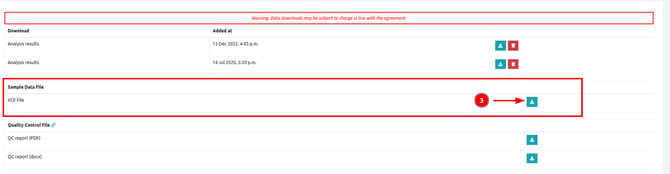
After completing a multi-sample analysis, you can download the VCF file from the analysis result page:
[](https://docs.varsome.com/hubfs/image-png-Sep-22-2026-12-29-05-2756-PM.png?hsLang=en)
[](https://docs.varsome.com/hubfs/image-png-Aug-24-2026-01-00-05-0102-PM.png?hsLang=en)
When downloading a VCF file from a multi-sample analysis you may notice that the column headers use internal numeric Sample IDs instead of your original patient identifiers. To map these internal IDs back to your specific patients, you can rely on the strict ordering system used during the analysis generation.
The order of the samples in the VCF file depends directly on the type of analysis performed:
- **Duo analyses:** The order is always the Mother first, followed by the Father.
- **Trio analyses:** The order is always the Proband first, followed by the Mother, and finally the Father.
- **Extended multi-sample analyses:** The order of the samples in the VCF file matches the exact order in which the samples were selected when launching the analysis.
Please note that this order is also reflected in the analysis name, as well as in the "**Coverage**", "**Allelic Balance**", and other columns associated with the samples.
- [Registration & Billing](https://docs.varsome.com/en/registration-billing?hsLang=en#main-content)
- [User account management](https://docs.varsome.com/en/registration-billing?hsLang=en#user-account-management)
- [Storage management](https://docs.varsome.com/en/registration-billing?hsLang=en#storage-management)
- [Pricing and Billing](https://docs.varsome.com/en/registration-billing?hsLang=en#pricing-and-billing)
- [VarSome Clinical Tokens](https://docs.varsome.com/en/registration-billing?hsLang=en#varsome-clinical-tokens)
- [Management of Samples and Analyses](https://docs.varsome.com/en/management-of-samples-and-analyses?hsLang=en#main-content)
- [Uploading files](https://docs.varsome.com/en/management-of-samples-and-analyses?hsLang=en#uploading-files)
- [Managing Samples](https://docs.varsome.com/en/management-of-samples-and-analyses?hsLang=en#managing-samples)
- [Managing Workflows](https://docs.varsome.com/en/management-of-samples-and-analyses?hsLang=en#managing-workflows)
- [Launching analyses](https://docs.varsome.com/en/management-of-samples-and-analyses?hsLang=en#launching-analyses)
- [Analysis of the results](https://docs.varsome.com/en/analysis-of-the-results?hsLang=en#main-content)
- [Analyses](https://docs.varsome.com/en/analysis-of-the-results?hsLang=en#analyses)
- [Results](https://docs.varsome.com/en/analysis-of-the-results?hsLang=en#results)
- [Filters](https://docs.varsome.com/en/analysis-of-the-results?hsLang=en#filters)
- [Reporting](https://docs.varsome.com/en/analysis-of-the-results?hsLang=en#reporting)
- [Quality Control](https://docs.varsome.com/en/analysis-of-the-results?hsLang=en#quality-control)
- [Legal & compliance](https://docs.varsome.com/en/legal-compliance?hsLang=en)
- [FAQ & Troubleshooting](https://docs.varsome.com/en/faq-troubleshooting?hsLang=en#main-content)
- [Troubleshooting](https://docs.varsome.com/en/faq-troubleshooting?hsLang=en#troubleshooting)
- [General](https://docs.varsome.com/en/faq-troubleshooting?hsLang=en#general)
- [Filters](https://docs.varsome.com/en/faq-troubleshooting?hsLang=en#filters)
- [User Interface](https://docs.varsome.com/en/faq-troubleshooting?hsLang=en#user-interface)
- [Pipelines](https://docs.varsome.com/en/faq-troubleshooting?hsLang=en#pipelines)
- [Features](https://docs.varsome.com/en/faq-troubleshooting?hsLang=en#features)
- [Scientific articles](https://docs.varsome.com/en/scientific-articles?hsLang=en)
- [VarSome API](https://docs.varsome.com/en/varsome-api?hsLang=en)
[](https://varsome.com)
**Resources**
[Query Examples](https://varsome.com/about/resources/examples/)
[Germline Classification](https://varsome.com/about/resources/germline-implementation/)
[Somatic Classification](https://varsome.com/about/resources/somatic-implementation/)
[White Papers & Other Resources](https://varsome.com/library/)
[Cite VarSome](https://varsome.com/about/general/varsome-citations/)
[System Status](https://status.saphetor.com/)
[Help Center](https://docs.varsome.com/en?hsLang=en)
**Legal**
[Terms of Use](https://varsome.com/information/legal/terms/)
[Privacy Policy](https://varsome.com/information/legal/privacy/)
[Information Security](https://varsome.com/information/legal/information-security/)
Copyright © 2025, Saphetor SA